GCAPI Test Harness
An asynchronous JavaScript and XML (AJAX) Test Harness for the API is available for both the "Live" and "Pre-Production" environments at the following web addresses:
Pre-Production: https://ciapipreprod.cityindextest9.co.uk/TradingApi/
Use this tool to test code that interacts with the GCAPI to ensure that it functions as you expect.
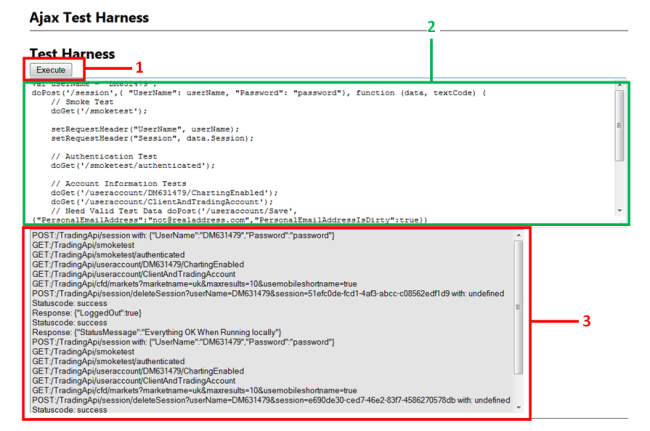
Test Harness Annotation
1. The [Execute] button runs the JavaScript code entered in the field box marked "2" (see below).
2. This field box is where you enter the JavaScript code that you wish to test.
3. When the code is executed, information messages are displayed here showing the results of code execution.
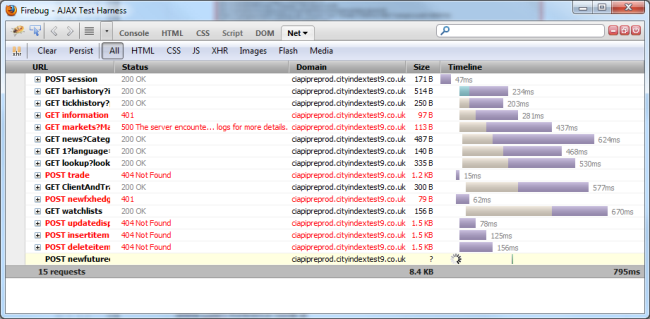
Tip: use the Firefox web browser together with the Firebug plugin to execute the Test Harness. The Firebug plugin provides additional useful information on the results of the API calls from your code.
A valid user account is required to use the Test Harness as GCAPI services require GAIN Capital API.
Sample GCAPI Code Walkthrough
The following walkthrough uses the Test Harness to show account login and information retrieval and the resultant responses received.
Execute the following code to login to your test user account. Note: the UserName and Password variables "XXXXXX" must be replaced with a functioning account username and password for the code to execute correctly.
// Login to user account
var userName = "XXXXXX";
doPost('/session',{ "UserName": userName, "Password": "XXXXXX"}, function (data, textCode)
{
setRequestHeader("UserName", userName);
setRequestHeader("Session", data.Session);
// Retrieve the account information
doGet('/UserAccount/ClientAndTradingAccount');
});
Upon successful login and account information retrieval, the information message display will contain the line "Statuscode: success". If you are using Firebug, you should see the following:


|
Questions or comments? Visit the FAQs at: http://faq.labs.gaincapital.com/ |
Copyright © 2020 GAIN Capital